Optimize Financial Data Security with User Access Control.
Not everyone from your accounting should have access to all the financial data of your company. Restrict their access with BillnBooks.
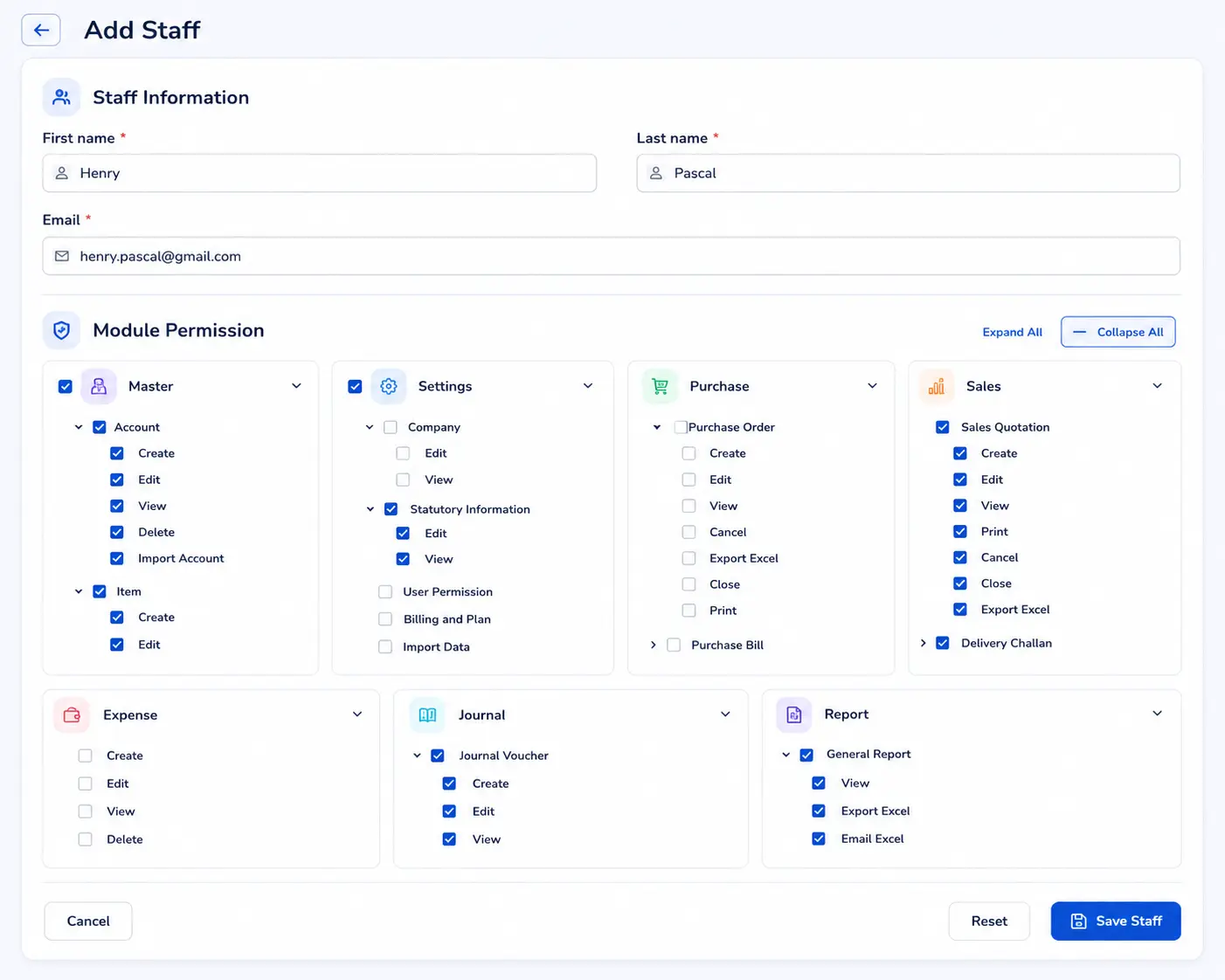
Not everyone from your accounting should have access to all the financial data of your company. Restrict their access with BillnBooks.
Not everyone from your accounting should have access to all the financial data of your company. Restrict their access with BillnBooks.
Know the qualities of user control feature and how it can help you assigning roles:
In BillnBooks if you provide access to your accounting application to employees of some other department or within the same department you can restrict them from editing and/or deleting entries.
In BillnBooks you can restrict junior accountants from printing invoices, sales return receipts, delivery challan, and purchase orders because every document should be processed after confirming with the head accountant.
When you hire a trainee you cannot directly allow them to make entries so for training purposes share viewing rights with them and let them observe how it is done.
With the bulk invoice feature, the sales team can multiple invoices at once. You never know when your sales hit the sky so it is best to provide access to this feature beforehand to cater to overwhelming demand.
The procurement department requires access to the Purchase module only as they have nothing to do with either accounting or GST. While sharing, restrict them from accessing other modules.
Allow downloading of reports to the executives of respective departments so that they can analyze their performance in an unrestrictive environment. In BillnBooks, one can download reports in excel and PDF format.
Find the benefits of utilizing user access control feature in BillnBooks:
Oftentimes owners of the company are preoccupied; they don’t have time to grant access to the team upon request. In that case, they can transfer full authority to the assigned person to do the needful.
BillnBooks aids in the delegation of responsibilities of the accounting team. As per their role, the head of the accounting team/owner can allow them to access respective modules.
In BillnBooks a full-fledged accounting team can work together without interfering with each other’s tasks. Due to the high level of collaboration, productivity improves.
In BillnBooks you can see what actions were taken by your teammates, allowing you to backtrack the undesired activity. The best thing is that the activity log also gives you the date and exact timing.
To share access to BillnBooks with your teammates, doesn’t take hours. Once you add the required information and specify the modules to share access, it gets processed within seconds.
An authorized executive can revoke access to any team member within split seconds. This is important when an employee resigns and you don’t want them to access your company data.
BillnBooks is the most advanced cloud-based accounting software in India. We have endeavored to help businesses with their various needs regarding GST compliance, inventory management, e-invoices, e-way bills, user access control, and accounting as well. We ensure that you won’t find any app that competes with us. Try BillnBooks and experience its usefulness for yourself.
We're here to help you with GST, billing, and setup anytime.
Go to Settings, click on ‘User & Permissions’ then click on ‘Add Staff’. Provide name and email address, that’s it.
You can add up to 1 staff member for free.
Yes, definitely. You can restrict them from exporting or printing your company’s financial data.
Yes, in the ‘User & Permission’ module by clicking on ‘Transfer Ownership’ you can completely transfer all authorities to someone who will handle BillnBooks on your behalf.
The following are the benefits of cloud accounting software for small and medium-scale businesses in India:
Stay on top of your GST obligations with regular updates and notifications with the best accounting software.
Say goodbye to spreadsheets! Automatically track your finances with ease. Save time and focus on what matters most – growing your business.
Generate compliant e-invoices instantly and say goodbye to paper clutter. Streamline your e-invoicing workflow and save time.